The correction is assigned directly to the relevant Bunker Delivery Note (BDN) so that the bunker quantity can be adjusted while keeping the correction traceable.
The same function can also be used to report debunkering, for example when fuel needs to be removed from the ship because it does not meet the required fuel specifications (off-spec bunkers).
📝 Step-by-step
- Open Bunkering Event (BDN)
Select Bunkering Event (BDN) from the menu and choose the relevant ship and reporting period. - Open the BDN
Find the BDN that needs to be corrected and click Edit.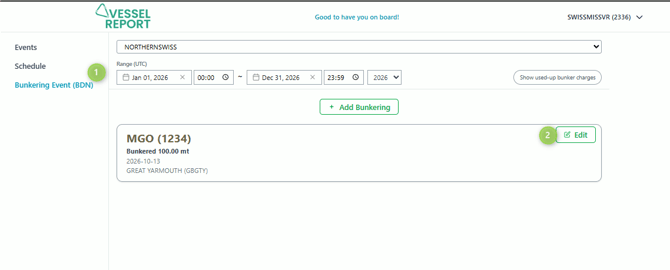
- Go to Sounding corrections
In the BDN details, locate the Sounding corrections section and click the edit icon.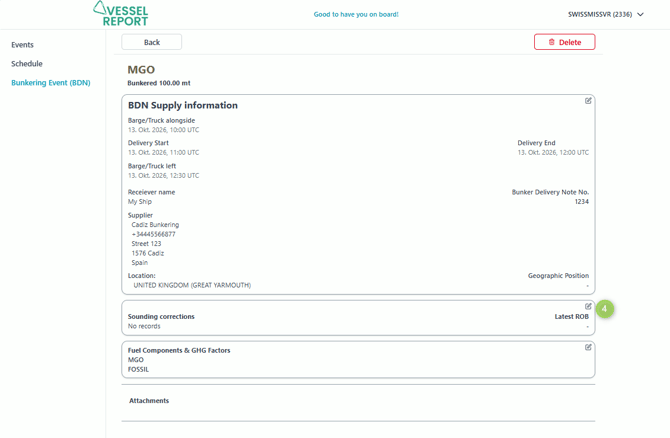
- Add a sounding correction
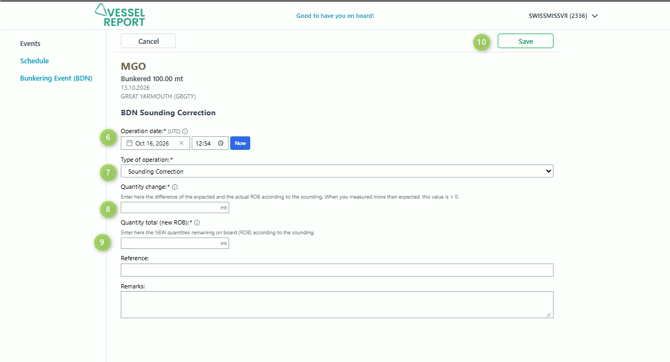
Click + Add BDN Sounding Correction.
- Enter the operation date and time
Enter the date and time when the sounding or debunkering operation was performed.
⏱️ The time must be entered in UTC. - Select the type of operation
Select the appropriate operation type:- Sounding Correction – to adjust the calculated ROB based on a physical sounding.
- Debunkering – to record fuel removed from the ship, for example due to off-spec bunkers.
- Enter the Quantity change
Enter the difference between the expected ROB and the actual ROB, or the quantity removed during debunkering.- Positive value (+): More fuel is available than calculated.
- Negative value (−): Less fuel is available than calculated, or fuel has been removed through debunkering.
Calculated ROB: 80 mt
Measured ROB: 82 mt
→ Quantity change: +2 mt
Example – Debunkering:
ROB before debunkering: 80 mt
Fuel removed: 20 mt
→ Quantity change: −20 mt - Enter the new ROB
Under Quantity total (new ROB), enter the actual remaining quantity after the correction or debunkering. In the debunkering example above, the new ROB would be 60 mt. - Add additional information if required
You can optionally enter a Reference and Remarks to document the reason or source of the adjustment. For debunkering, we recommend recording the reason for removal, such as Off-spec fuel – debunkered to supplier. - Save the correction
Click Save to record the adjustment.
💡 A sounding correction does not replace the original BDN quantity, upon the next bunker delivery. Instead, it documents a subsequent adjustment while preserving the original bunker delivery information.
Always assign the correction or debunkering to the relevant BDN to maintain a transparent bunker history.