CII Estimation on the Reporting Dashboard
The Reporting Dashboard shows an estimated year-to-date annual operational CII for each ship.
🔴 ① If the estimated CII is above the targeted CII from your SEEMP III, a warning symbol is displayed.
Note: The calculated CII is an indicative value and should not be treated as a definitive result.
🔴 ② Click Go to CII estimation to open the detailed CII Estimation dashboard.

CII Estimation dashboard
The detailed dashboard provides further information and options for analysing the ship's CII:
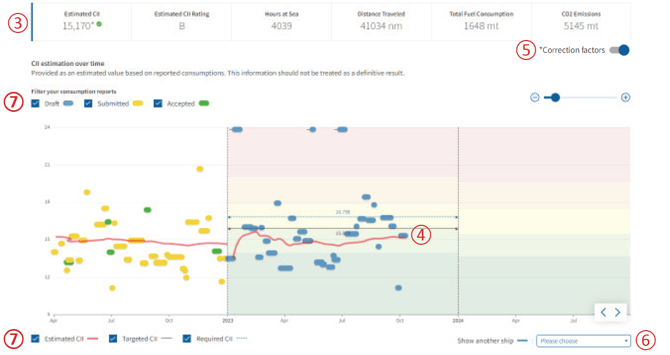
🔴 ③ At the top of the dashboard, you can see the estimated CII, CII rating and additional aggregated year-to-date values.
🔴 ④ The graph shows the development of the estimated CII as a red line. The colour of each voyage corresponds to the status of its voyage report.
🔴 ⑤ Use the Correction factors toggle to include or exclude correction factors and see their effect on the calculated CII.
🔴 ⑥ Select another ship from your fleet from the drop-down menu to compare its CII.
🔴 ⑦ Above the graph, you can include or exclude voyages with specific reporting statuses from the CII calculation. Below the graph, you can show or hide the lines for Estimated CII, Targeted CII and Required CII.
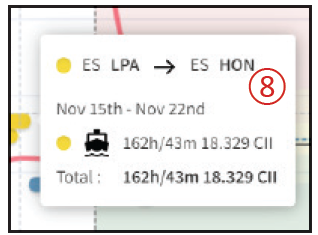
🔴 ⑧ Hover over a voyage to view its details and CII. Click the UN LOCODEs in the information window to jump directly to the corresponding voyage in the Reporting List.
Outlier voyages are displayed at the top or bottom edge of the graph.
Calculate the estimated CII for a specific period
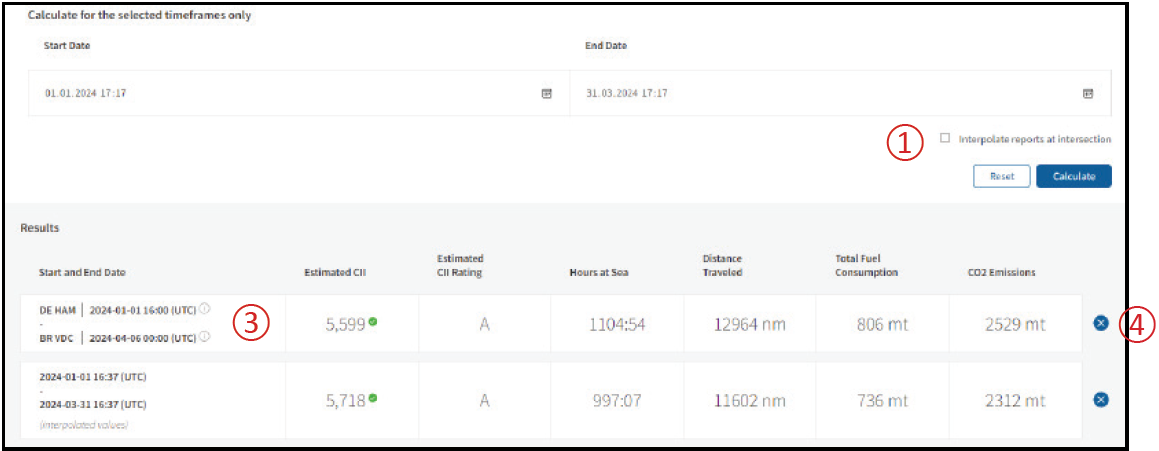
Below the graph, you can calculate the estimated annual operational CII for a specific time period.
Enter the required start date and end date.
🔴 ① Choose whether reports at the start and end of the selected period should be interpolated:
- Interpolation activated: Data from the voyage or port report in which the start or end date falls is interpolated based on time.
- Interpolation deactivated: The start and end dates are set to the nearest available ATD or ATA of a voyage or port report.
🔴 ② The results table indicates if the calculation is based on interpolated values.
🔴 ③ If no interpolation is used, the corresponding UN LOCODE and ATA/ATD are shown as the start or end of the calculation period.
Whether the calculated results include correction factors depends on the Correction factors toggle above the graph.
🔴 ④ Your selected timeframes are saved for your user account only. To remove a saved timeframe, click the X on the right.