1. Download the EU MRV or FuelEU Monitoring Plan as an XML file from THETIS.
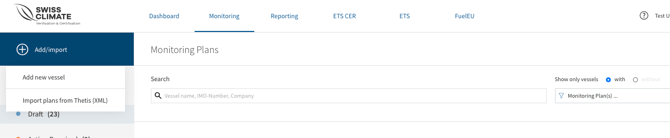
2. Go to Monitoring → Add/Import → Import plans from THETIS (XML).
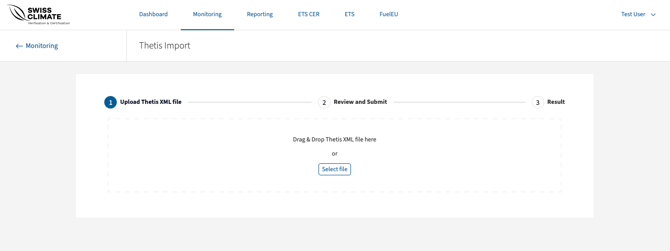
3. Drag and drop the XML file into the upload area or click Select file.
4. The system displays the vessels contained in the file and indicates whether an existing Monitoring Plan is in Draft or Submitted status.
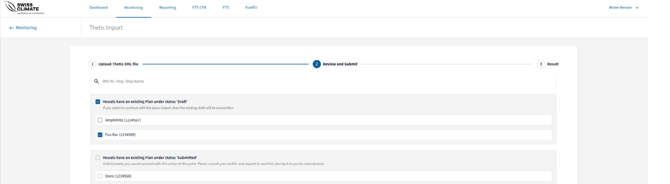
5. Depending on the status of the monitoring plan, the system shows you different options: select the vessels you want to import and click →Confirm. In this example, you can see which of your vessels already have an existing plan in Draft status and which have an existing plan in Submitted status.
6. Once completed, the system confirms the successful import.
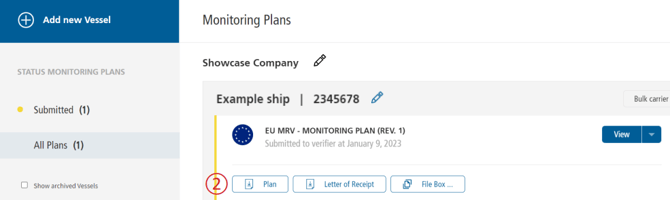
Once submitted the status and color will change.
You can download a preliminary version of your plan by clicking → Plan ②
💡If the vessel does not yet exist, the system automatically recognizes this, adds it to your fleet, and imports the monitoring plan.