🔍 What is Data Quality (DQ)?
Data Quality (DQ) in Fleettracker refers to automated validation checks applied to incoming ship data such as:
- Arrival, departure and noon reports
- Drifting, anchorage and canal transit events
- AIS positions
- Bunker data (BDNs)
These checks ensure that the data is complete, consistent, and plausible.
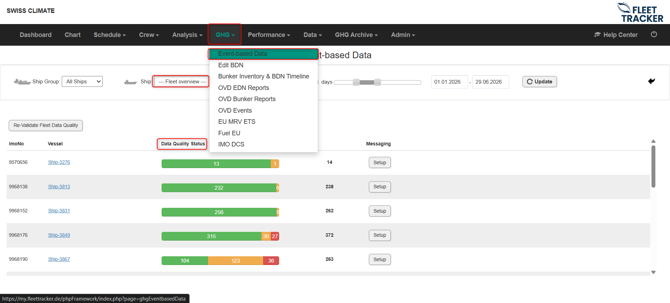
The fleet overview under the GHG tab shows the DQ status of you fleet.
🤖 Automatic Data Quality Checks
Fleettracker continuously analyzes incoming data and flags potential issues automatically.
Examples of typical checks include:
- 📍 Position plausibility
Detects unrealistic jumps in reported positions or incorrect coordinates - ⏱️ Time inconsistencies
Identifies overlapping or missing timestamps between events - ⚡ Speed & consumption anomalies
Flags unrealistic speed, fuel consumption, or engine values - ⛽ Fuel data inconsistencies (BDNs)
Detects mismatches in fuel quantities, types, or emission factors - 📉 Missing or incomplete data
Highlights gaps in reporting or incomplete reports
🚩 How Data Quality Issues are Displayed
Data quality issues are clearly visible across the platform:
- In the Event-based Data module → flagged directly in the timeline
- In the Edit-BDN module → flagged directly in the bunkering event
This allows operators to quickly identify where action is needed.
💡 Note: If the ship is using Vessel.report (Our web-based reporting tool), detected Data Quality issues are also displayed directly in the timeline, allowing the crew to identify and correct them immediately.
🛠️ How to Resolve Data Quality Issues
Fleettracker provides multiple ways to resolve data quality issues. However, there is a clear recommended workflow to ensure data integrity and auditability:
✅ 1. Preferred: Use the Data Quality Report (Recommended Process)
The ideal approach is that the Data Quality report is send directly to the ship:
- 📧 Regular generated DQ reports to be send to the ship (Can be automated)
- 📝 Add remarks and clear instructions from the shore-side DQ team
- 🚢 The crew reviews and corrects the data at the source
- 🔄 Corrected data is resubmitted through the normal reporting process
👉 This ensures:
- Data remains consistent with original ship reporting
- Full transparency and traceability
- Clear communication between shore and ship
💬 Adding Remarks & Instructions
Before sending the report, shore users can:
- Add comments or correction instructions
- Highlight specific issues for the crew
- Provide guidance on how to correct the data
These remarks are included in the DQ report and help the crew resolve issues efficiently.
⚠️ 2. Alternative: Edit Data from Shore (Second Option Only)
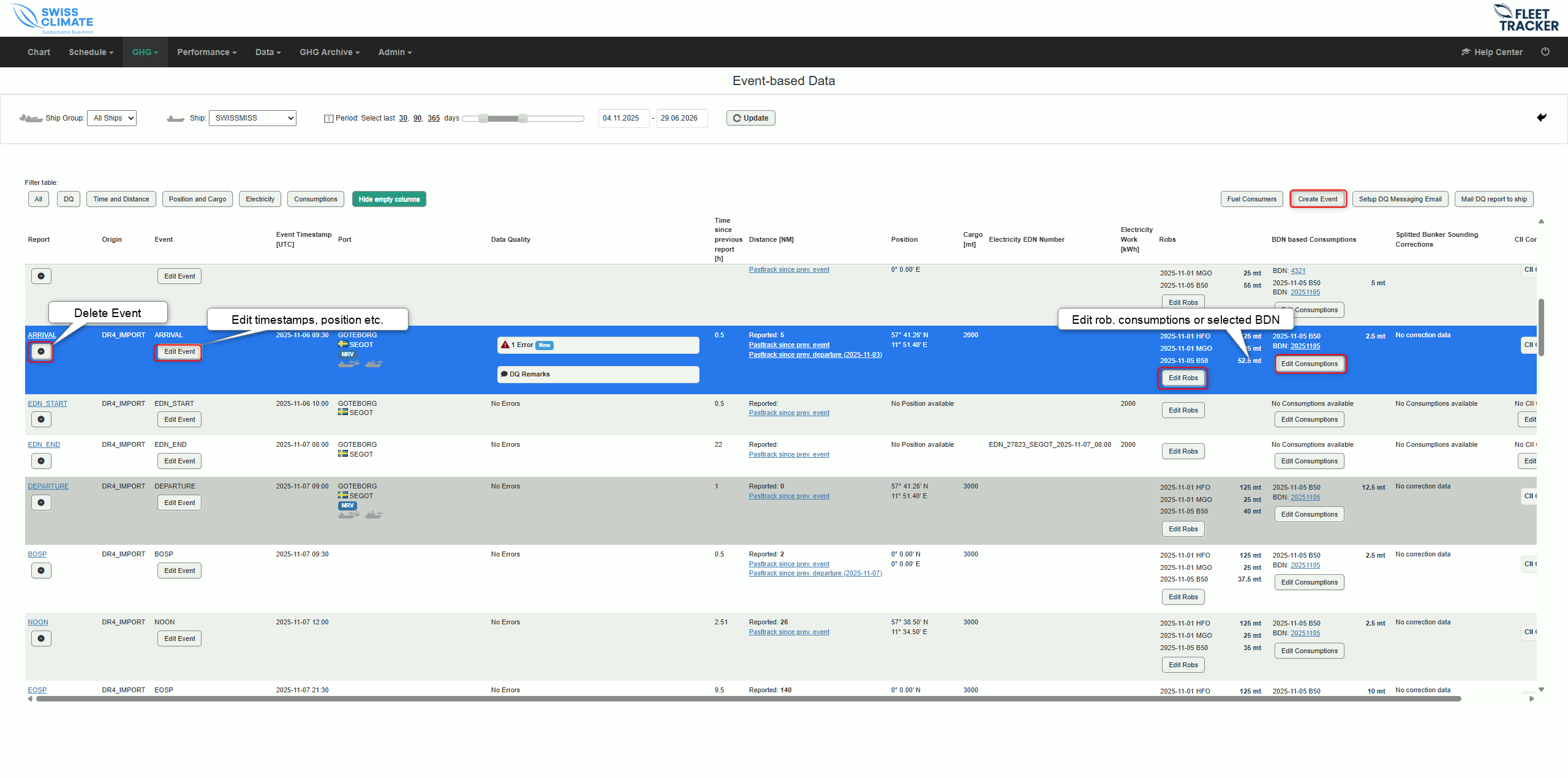
It is also possible to correct data directly in Fleettracker:
- ✏️ Edit values in reports or events via editors
- 🔧 Add missing data
However:
This should only be used as a secondary option, for example:
- If immediate correction is required
- If the ship cannot provide timely feedback
- For minor corrections
👉 Important:
- Editing requires special user permissions
- Contact your Fleettracker admin if access is needed
- 🔒 Note: When data is edited by shore-side personnel, it will no longer be updated by incoming ship reports. The event or BDN gets frozen.
⚡ Why Data Quality Matters
High data quality is essential for:
- 📊 Accurate performance analysis
- 🌱 Reliable emissions reporting (MRV, EU ETS, IMO DCS)
- ⚓ Efficient fleet operations
- 📈 Trustworthy KPIs and decision-making
Poor data quality can directly impact compliance and operational efficiency.
💡 Best Practice
- Regularly review DQ flags in the Event-based Data module
- Always prioritize corrections by the ship via DQ reports
- Use shore-side edits only when necessary
- Keep communication clear using remarks in the DQ report