From the FuelEU overview, you can select an individual ship to review its FuelEU Maritime performance in more detail.
You can search by ship name, IMO number or company ⑥. Use the selection option ⑦ to select or deselect all ships. The displayed compliance balances are recalculated according to your selection.
The Simulated Compliance ⑧ function can also be accessed for an individual ship.

Individual ship view
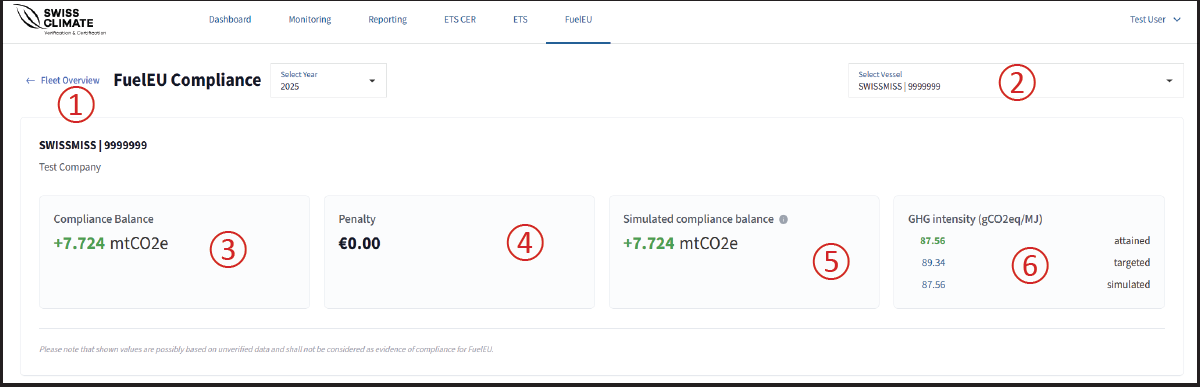
After selecting a ship, the following information and functions are available:
① Fleet Overview
Click Fleet Overview to return to the fleet-level FuelEU overview.
② Selected ship
The currently selected ship is displayed here. You can switch between ships belonging to the same company.
③ Compliance Balance
Shows the ship’s calculated FuelEU Compliance Balance.
④ Penalty
Shows the calculated FuelEU penalty for the ship.
⑤ Simulated GHG Intensity
Shows the simulated GHG intensity based on the actual data and any simulations applied to the ship.
⑥ GHG Intensity
The overview displays the ship’s attained, targeted and simulated GHG intensity, allowing you to compare its current performance with the applicable target and simulated scenario.