The FuelEU Manager provides a current overview of your fleet’s FuelEU Maritime performance based on the available FuelEU Monitoring Plan and reporting data.
The dashboard includes all statuses and displays both the actual compliance situation and simulated values. Changes to the underlying data may take up to five minutes to appear.
❗Important: The FuelEU Manager is a commercial tool and is not intended for official regulatory reporting.
FuelEU fleet overview
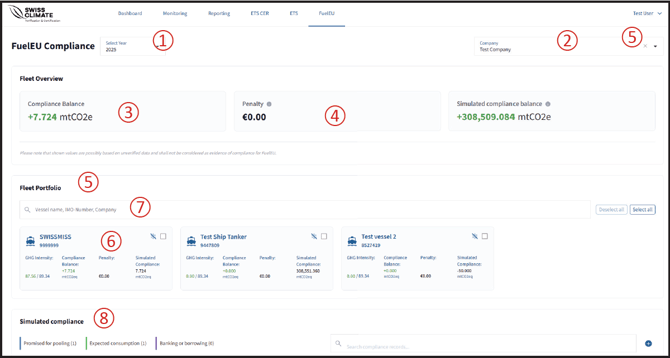
① Select the year
Use the year selector to display the FuelEU information for the relevant reporting year.
② Select a company
Select a company to view its FuelEU information in more detail.
③ Compliance Balance
Shows the summed Compliance Balance for the displayed fleet.
④ Penalty
Shows the summed calculated penalty for the displayed fleet.
⑤ Fleet Portfolio
Displays all ships included in your subscription and provides an overview of their FuelEU performance.
Access ships and companies
⑥ Open an individual ship
Click the ship name or IMO number to access the detailed FuelEU information for that ship.
⑦ ISM Company
The responsible ISM company is based on the information provided in section B.2 of the FuelEU Monitoring Plan. You can use the company selection to switch between companies.
⑧ Simulated Compliance
The Simulated Compliance function allows you to assess the potential impact of different compliance measures, including:
- pooling of compliance balances,
- use of biofuel,
- banking a compliance surplus, and
- borrowing compliance from the following year.
The resulting values are displayed separately as simulated compliance values.
❗Note: Simulated values are for evaluation purposes and do not change the underlying official reporting data.