The FuelEU Company Page provides the same main overview and functions as the FuelEU Landing Page, but only for the ships belonging to the selected company.
This allows you to focus on the FuelEU compliance situation of an individual company and its fleet.
Company overview
① Selected company
The currently selected company is displayed in the upper-right corner.
Click the X next to the company to return to the overall FuelEU fleet view.
② Company fleet
The overview displays all ships assigned to the selected company together with their relevant FuelEU information.
From here, you can access the individual ships and use the available FuelEU Manager functions for the selected company.
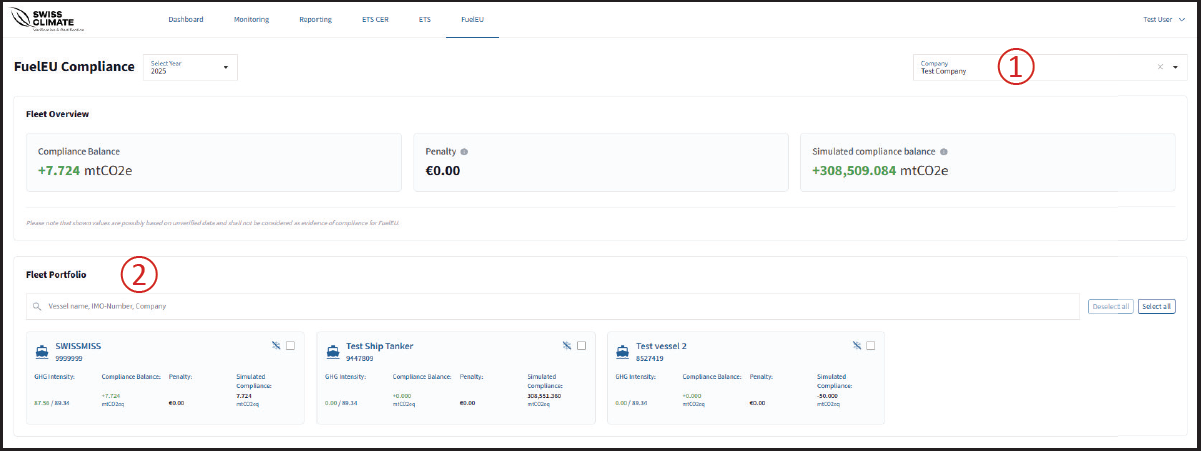
The displayed Compliance Balance, penalty and simulated values are calculated for the ships belonging to the selected company.
❗Note: As on the FuelEU Landing Page, the FuelEU Manager is a commercial tool and is not intended for official regulatory reporting.