The ETS Dashboard provides an overview of your ships’ EU ETS emissions and the number of EU Allowances (EUAs) required for compliance. It helps you monitor your EU ETS exposure and provides access to the EUA trading and allocation functions.
From the ETS Dashboard, you can:
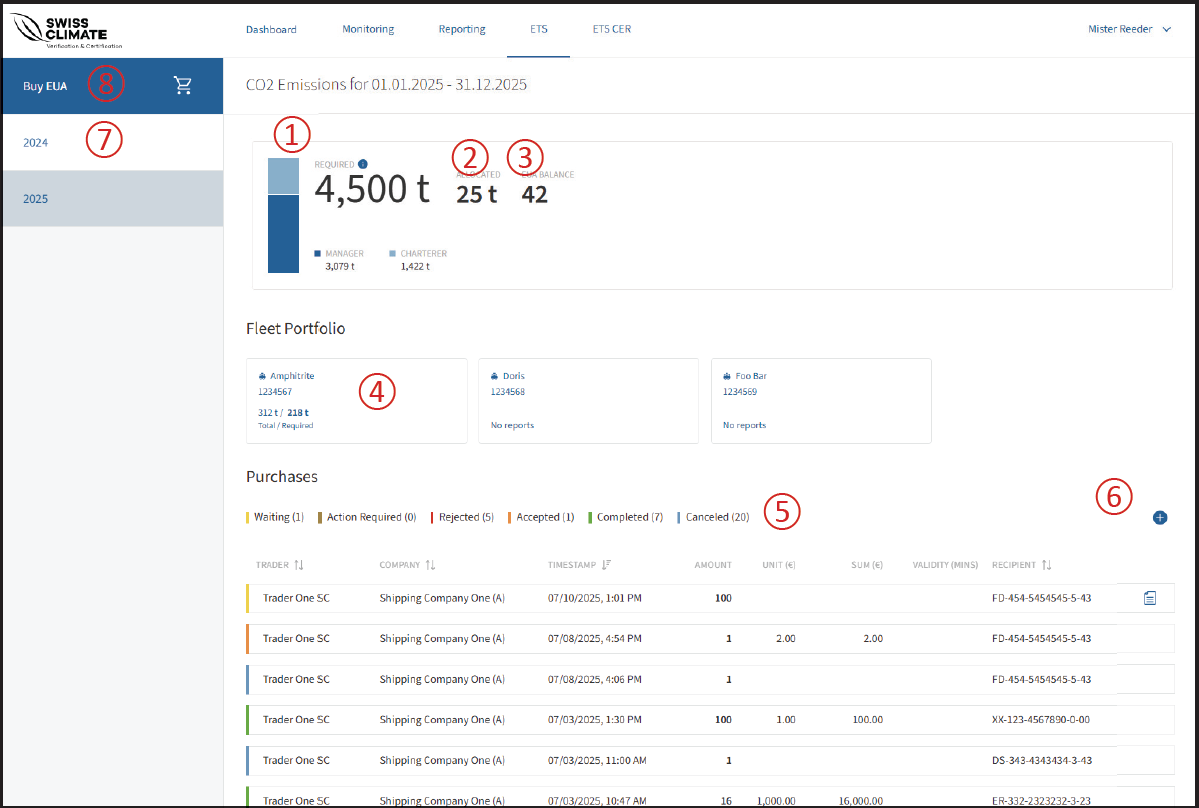
🔴 ① Manager and Charterer emissions
The blue bar shows the distribution of GHG emissions between the Manager and Charterer, providing an overview of responsibilities and progress towards compliance.
🔴 ② Allocated EUAs
Shows the number of EUAs that have already been allocated.
🔴 ③ Available EUAs
Shows the number of EUAs currently available for allocation.
🔴 ④ Ship details
Click on a ship tile to view its emission reports and manage allocations.
🔴 ⑤ Filter by status
The dashboard shows all statuses. Click on a status to filter the displayed list.
🔴 ⑥ Add allowances manually
Click the plus icon to manually add purchased or received allowances that were recorded outside the MRV Cockpit.
🔴 ⑦ Select the reporting year
Use the Year Selector to display the relevant reporting period.
🔴 ⑧ Buy EUA
Click Buy EUA to access the Trading Tool and start the Request for Quotation (RFQ) process.
❗Note: EU Allowances can be requested directly through the MRV Cockpit using the Request for Quotation (RFQ) process. The detailed purchasing process is covered separately in the Buy EUA article.