The Simulated Compliance function allows you to assess the potential impact of different measures on your FuelEU Maritime compliance without changing the underlying reporting data.
Available simulation options include:
- Pooling – simulate adding or subtracting compliance balance through a pool.
- Biofuel – forecast the effect of using biofuel.
- Banking – simulate banking a compliance surplus.
- Borrowing – simulate borrowing compliance from the following year.
Add a simulation
Click the + icon to create a new simulation.
Select the relevant reason for the simulation, enter the required information and click Save.
Manage simulations
Existing simulations are displayed in the overview.
From here, you can:
- filter the simulations,
- edit an existing simulation, or
- delete a simulation.
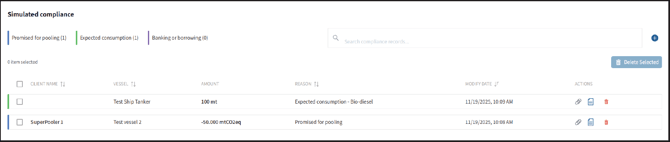
The entered simulations affect the displayed Simulated Compliance Balance and the Simulated Attained GHG Intensity, allowing you to compare the simulated scenario with the ship's current FuelEU performance.
❗Note: Simulated Compliance is intended for evaluation and planning purposes and does not change the underlying reporting data.